Pages

Subscribe:

Ads 468x60px

Contributors

Sunday, January 15, 2012

Enabling and Exploring god mode in windows 7


God Term is term that is defined by the Windows developers at the Microsoft which means to create that mode where all the settings can be accessed without any need to go through the browsing options through files and folders in the Control Panel. God Mode as the name suggest is not a part of any standard process of the operating system.
The God Mode hack of Windows 7 and Vista is a quick and easy way to make an interface that will show all the settings and values that are essential for the Windows.
To enable God Mode on Windows 7:
a. In any drive of your computer create a New Folder and rename it as GodMode.
b. Now append the string (without quotes) “.{ED7BA470-8E54-465E-825C-99712043E01C}” after the name of the folder so that the resultant string looks like “GodMode.{ED7BA470-8E54-465E-825C-99712043E01C}”
god mode windows 7
c. Once you renamed the folder, the icon of the folder will change automatically and the name will be changed to GodMode.
god mode
The God Mode is known to give some problems with 64-bit Windows Vista. Also note that any changes that you make on the God Mode will be made directly to the registry so don’t make any major changes unless you are very sure about it. Look at the contents of the GodMode folder.
god mode enabled

Real Pool PC Game | Mediafire


Real Pool PC Game | Mediafire
Upload: Mediafire
Size: 5MB

Download Link:
http://www.mediafire.com/download.php?9tkpue97oqqsbwt

Atomix Virtual DJ Professional v5.04 + Serial


VirtualDJ is the hottest MP3 mixing software, targeting every DJ from bedroom DJs to professional superstars like Carl Cox.
With its breakthrough BeatLock engine, your songs will always stay in the beat, and you can work your mixes incredibly faster than any other DJ could.

> The automatic seamless loop engine and the brand new synchronised sampler will let you perform astounding remixes live, with no preparation at all.
> The visual representation and the cues allow you to clearly see the song's structure, and never be surprised by a break anymore.
> The vinyl controls will let you scratch like on a real turntable, except that with the beatlock engine your scratches will never end out of the beat.


Windows 8 Transformation Pack For XP | Mediafire


Windows 8 Transformation Pack For XP | Mediafire
Size : 50MB
Upload: Mediafire

Download Link:
http://mediafire.com/?n4mjrrtjjjz

Adobe Photoshop CS5 Portable Mediafire Link


Upload Site.......... Mediafire

Size....................... 65MB


Mediafire Password moviesnhacks

Download Link:
http://www.mediafire.com/?n816jqhadcdbddt

WiFi Slax Wireless Hacking Live-CD v3.1 + Plugins Updated


WiFi Slax Wireless Hacking Live-CD v3.1 + Plugins Updated 635.24 MB

Basic Directions:
1)Boot from cd
2)Get the wep key
3)Write it down
4)Reboot into windows
5)Connect using wep key.

WEP is an encryption scheme, based on the RC-4 cipher, that is available on all 802.11a, b and g wireless products. WEP uses a set of bits called a key to scramble information in the data frames as it leaves the access point or client adapter and the scrambled message is then decrypted by the receiver. Both sides must have the same WEP key, which is usually a total of 64 or 128 bits long. A semi-random 24 bit number called an Initialization Vector (IV), is part of the key, so a 64 bit WEP key actually contains only 40 bits of strong encryption while a 128 bit key has 104. The IV is placed in encrypted frames header, and is transmitted in plain text.

Traditionally, cracking WEP keys has been a slow and boring process. An attacker would have to capture hundreds of thousands or millions of packets? a process that could take hours or even days, depending on the volume of traffic passing over the wireless network. After enough packets were captured, a WEP cracking program such as Aircrack would be used to find the WEP key.

                                                          Download links Filesonic :

Saturday, January 14, 2012

Google Maps for mobile(TRACK YOUR MOBILE)


Google Maps for mobile had its sixth birthday earlier this month and we’re celebrating by releasing the next generation of Google Maps for Android, which is first to get indoor Google Maps—announced moments ago on the Official Google Blog. We also have two other great additions in this release: a new way to switch between features in the toolbar and a new Places home screen. 

Mapping the vast indoors 

When you’re inside an airport, shopping mall, retail store, or other public space, Google Maps 6.0 for Android brings the freestanding map directory to the palm of your hands -- helping you determine where you are, what floor you're on, and where to go indoors. For example, in this busy travel season, you can use Google Maps 6.0 to help you find your way around airports. 

Detailed floor plans automatically appear when you’re viewing the map and zoomed-in on a building where indoor map data is available. The familiar “blue dot” icon indicates your location within several meters, and when you move up or down a level in a building with multiple floors, the map will automatically update to display which floor you’re on.

See the full announcement for more details or to demo indoor Google Maps, start here.


Mall of America in Minneapolis before and after, with a floor selector


San Francisco International Airport before and after, with 3D tilt


Switching between features gets easier

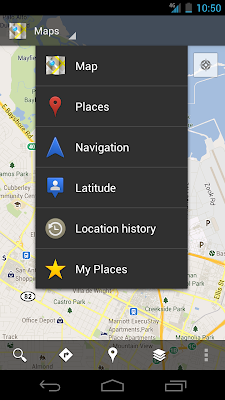
When you open Google Maps for Android, you can do many things: view your location on the map, discover where to go with Places, get GPS turn-by-turn directions with Navigation, check in to share your location, and more. We wanted to make it easier to hop from one feature to another; so, we’ve added a drop-down menu to the top toolbar for quick access.


New drop down menu to switch between features


We hope this menu helps you get to your favorite parts of Google Maps faster or shows you some features you haven’t tried yet. 

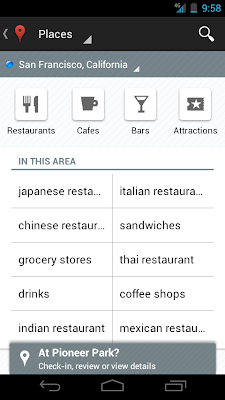
Discovering what’s great nearby with the new Places home screen

The new Places home screen includes popular searches for your current location, so you can find the best spots in any area you travel.


Redesigned Places home screen with popular searches for your area


To start using Google Maps 6.0 for Android, download the update from Android Market. This update works for Android OS 2.1+ devices everywhere Google Maps is currently available. 


NOte:- 
         For tracking other mobiles with wap services visit the below link website


ShareThis