Pages

Subscribe:

Ads 468x60px

Contributors

Sunday, January 15, 2012

Enabling and Exploring god mode in windows 7


God Term is term that is defined by the Windows developers at the Microsoft which means to create that mode where all the settings can be accessed without any need to go through the browsing options through files and folders in the Control Panel. God Mode as the name suggest is not a part of any standard process of the operating system.
The God Mode hack of Windows 7 and Vista is a quick and easy way to make an interface that will show all the settings and values that are essential for the Windows.
To enable God Mode on Windows 7:
a. In any drive of your computer create a New Folder and rename it as GodMode.
b. Now append the string (without quotes) “.{ED7BA470-8E54-465E-825C-99712043E01C}” after the name of the folder so that the resultant string looks like “GodMode.{ED7BA470-8E54-465E-825C-99712043E01C}”
god mode windows 7
c. Once you renamed the folder, the icon of the folder will change automatically and the name will be changed to GodMode.
god mode
The God Mode is known to give some problems with 64-bit Windows Vista. Also note that any changes that you make on the God Mode will be made directly to the registry so don’t make any major changes unless you are very sure about it. Look at the contents of the GodMode folder.
god mode enabled

Real Pool PC Game | Mediafire


Real Pool PC Game | Mediafire
Upload: Mediafire
Size: 5MB

Download Link:
http://www.mediafire.com/download.php?9tkpue97oqqsbwt

Atomix Virtual DJ Professional v5.04 + Serial


VirtualDJ is the hottest MP3 mixing software, targeting every DJ from bedroom DJs to professional superstars like Carl Cox.
With its breakthrough BeatLock engine, your songs will always stay in the beat, and you can work your mixes incredibly faster than any other DJ could.

> The automatic seamless loop engine and the brand new synchronised sampler will let you perform astounding remixes live, with no preparation at all.
> The visual representation and the cues allow you to clearly see the song's structure, and never be surprised by a break anymore.
> The vinyl controls will let you scratch like on a real turntable, except that with the beatlock engine your scratches will never end out of the beat.


Windows 8 Transformation Pack For XP | Mediafire


Windows 8 Transformation Pack For XP | Mediafire
Size : 50MB
Upload: Mediafire

Download Link:
http://mediafire.com/?n4mjrrtjjjz

Adobe Photoshop CS5 Portable Mediafire Link


Upload Site.......... Mediafire

Size....................... 65MB


Mediafire Password moviesnhacks

Download Link:
http://www.mediafire.com/?n816jqhadcdbddt

WiFi Slax Wireless Hacking Live-CD v3.1 + Plugins Updated


WiFi Slax Wireless Hacking Live-CD v3.1 + Plugins Updated 635.24 MB

Basic Directions:
1)Boot from cd
2)Get the wep key
3)Write it down
4)Reboot into windows
5)Connect using wep key.

WEP is an encryption scheme, based on the RC-4 cipher, that is available on all 802.11a, b and g wireless products. WEP uses a set of bits called a key to scramble information in the data frames as it leaves the access point or client adapter and the scrambled message is then decrypted by the receiver. Both sides must have the same WEP key, which is usually a total of 64 or 128 bits long. A semi-random 24 bit number called an Initialization Vector (IV), is part of the key, so a 64 bit WEP key actually contains only 40 bits of strong encryption while a 128 bit key has 104. The IV is placed in encrypted frames header, and is transmitted in plain text.

Traditionally, cracking WEP keys has been a slow and boring process. An attacker would have to capture hundreds of thousands or millions of packets? a process that could take hours or even days, depending on the volume of traffic passing over the wireless network. After enough packets were captured, a WEP cracking program such as Aircrack would be used to find the WEP key.

                                                          Download links Filesonic :

Saturday, January 14, 2012

Google Maps for mobile(TRACK YOUR MOBILE)


Google Maps for mobile had its sixth birthday earlier this month and we’re celebrating by releasing the next generation of Google Maps for Android, which is first to get indoor Google Maps—announced moments ago on the Official Google Blog. We also have two other great additions in this release: a new way to switch between features in the toolbar and a new Places home screen. 

Mapping the vast indoors 

When you’re inside an airport, shopping mall, retail store, or other public space, Google Maps 6.0 for Android brings the freestanding map directory to the palm of your hands -- helping you determine where you are, what floor you're on, and where to go indoors. For example, in this busy travel season, you can use Google Maps 6.0 to help you find your way around airports. 

Detailed floor plans automatically appear when you’re viewing the map and zoomed-in on a building where indoor map data is available. The familiar “blue dot” icon indicates your location within several meters, and when you move up or down a level in a building with multiple floors, the map will automatically update to display which floor you’re on.

See the full announcement for more details or to demo indoor Google Maps, start here.


Mall of America in Minneapolis before and after, with a floor selector


San Francisco International Airport before and after, with 3D tilt


Switching between features gets easier

When you open Google Maps for Android, you can do many things: view your location on the map, discover where to go with Places, get GPS turn-by-turn directions with Navigation, check in to share your location, and more. We wanted to make it easier to hop from one feature to another; so, we’ve added a drop-down menu to the top toolbar for quick access.


New drop down menu to switch between features


We hope this menu helps you get to your favorite parts of Google Maps faster or shows you some features you haven’t tried yet. 

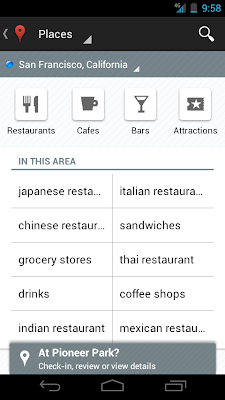
Discovering what’s great nearby with the new Places home screen

The new Places home screen includes popular searches for your current location, so you can find the best spots in any area you travel.


Redesigned Places home screen with popular searches for your area


To start using Google Maps 6.0 for Android, download the update from Android Market. This update works for Android OS 2.1+ devices everywhere Google Maps is currently available. 


NOte:- 
         For tracking other mobiles with wap services visit the below link website


Friday, January 13, 2012

Listen to Music With Your Friends


Music is one of the most powerful and fun ways to connect. Whether it's at a concert with a bunch of people or on a long car ride with your best buddy, we love listening to music with our friends. But what if you could listen to music with your friends when you're alone, like at work, at home or on the go?

Today, with music services on Facebook, there's a new way to listen with friends. This feature lets you listen along with any of your friends who are currently listening to music. You can also listen together in a group while one of your friends plays DJ.  

You can listen to the same song, at the exact same time—so when your favorite vocal part comes in you can experience it together, just like when you're jamming out at a performance or dance club.

How It Works

Look for the music note in the chat sidebar to see which of your friends are listening to music. To listen with a friend, hover over their name, and click the Listen With button. The music will play through the service your friend is using.

When a new song plays, you'll come along for the ride, discovering new music while your friend DJs for you.


You'll also have the option to chat about what you're listening to.  As other people start listening along, they'll join the party in a group chat.


You can control who you're listening along with through your settings. Learn more here.

Rollout Starts Today

Now, you can experience enjoying music together with your friends no matter where you are. This feature will start rolling out over the next few weeks. We hope you enjoy listening with friends!

Thursday, January 12, 2012

Best Browser For Android

Dolphin Browser HD is the FASTEST, EASIEST and most FUN mobile Web browser

Dolphin Browser is the world’s first Gesture, Webzine and Add-on enabled mobile web browser on Android.
★ #1 Mobile Web Browser on Android Market
★ Over 10,000,000 total downloads
★ #2 on CNET’s 100 Android Apps for 2011
★ #1 PC Mag’s “The 40 Best Free Apps for 2011″

Publish your Blog as a Magazine with Google Currents


Google’s widely anticipated alternative to Flipboard is finally here. It’s called Google Currents and the next screenshot should you give an idea of what Currents is all about.
Google Currents Producer
Google Currents is a Flipboard like app that lets you read blogs, news websites and other online publications in a magazine format on your mobile phone and tablet devices. The app is available for both Android and iOS platforms.
One big advantage with Google Currents is that you can read your subscriptions offline and it will even download the embedded images for offline access.
You can get Google Currents now from the Android Market and the iTunes Store. This is currently available only for US users but there’s at least an easy workaround for iPhone /iPad users.

Publishing to Google Currents

google currents logoAs a web publisher, you can package one or more RSS feeds, image slideshows, tweets, videos, social network updates and any other HTML content into an “edition” and publish it to Google Currents which others can then subscribe to on their tablet or mobile phone.
[*] Digital Inspiration is also available on Google Currents.
There’s no programming required as Google Currents provides an web editor (screenshot) for publishers to create these bundles. You can also pull content from Google Docs andePUB ebooks into Currents. The default layouts are beautiful but advanced users may apply their own CSS styles to further customize the appearance of their magazine.

Read RSS Feed with Google Currents

Google Currents can also be used as a RSS reader to follow feeds that are not available as standalone editions. Simply subscribe to any RSS feed inside Google Reader and then pull it directly into Google Currents using Add More –> Library –> Google Reader. The plain feed will automatically be served in a magazine layout similar to other editions.

Google Currents vs Flipboard, etc.

There are quite a few reading apps – like Flipboard, Yahoo LiveStand, Pulse, Zite and AOL Editions - that let you publish (and consume) online content in a magazine format. However, Google Currents is probably the only app that will share advertising revenue with publishers which is obviously a big incentive.
When Amazon introduced blog publishing for Kindle, there was a concern that people would publish someone else’s RSS feed as their own and monetize it through the Kindle Store. That is however unlikely to happen with Google Currents as it only lets you include content from domains that you have verified through Google Webmaster Tools.

Facebook Timeline Enabled in Android and iOS Updated Application. iPad to Get It in Mid January.

Facebook timeline for mobile


The latest innovative idea put forward by Facebook is the Facebook Timeline. This latest profile layout metamorphoses your account to online scrapbook. Here you can show up the precious moments of your life easily with more grace and when needed, you can also recur your earlier Facebook activities. The role of mobiles is obvious and to be treated with respect.
A big part of users usually access internet through mobile phone these days. This has facilitated the frequent visits to Facebook from anywhere at any time. So any new feature must be compatible and also comfortable to the mobile phones.
Soon after the launch of this timeline profile feature, the Facebook team has informed the release of the same for Android & iOS mobiles. Since the screen is smaller there is a single column in timeline rather than two as on a normal system. Even then this compromise never negatively alters the looks and the same pleasing view is reciprocated from the mobiles too. Now you can see your friend’s profile as their history and this experience is really exciting. The images feature more in this new provision from Facebook. These photos and the other posts can be swiped horizontally. Thus viewing multiple posts or photos can be done quickly and with more ease. Swiping can also be done to navigate towards your photos, maps, subscribers and many more. Apart from maps, subscribers and photo albums users can also know the apps which are used by them on their Smartphone. Exploitation of the opportunities is the success factor of the successful ones. With this latest release, along with a high visual experience Facebook has focused its eye on the ever blooming field of mobile market.
Mobile timeline is now available on touch devices using m.facebook.com, and Facebook for Android (version 1.8.1) along with Facebook for iOS version 4.1, for iPhone and iPod Touch devices.
Download Android and Apple iOS Application Updated for Facebook Timeline.
Download Android Facebook Application here – [LINK]
Download iOS Facebook Application here – [LINK]
Facebook Timeline for iPad.
Facebook is aiming to make Timeline 100% compatible with iPad by the Mid or Late of January 2012. The delay in the availability is the cause of last-minute bugs. Users can always browse the new Timeline interface on Facebook.com on their iPad devices, however, the web version doesn’t work 100% with the iPad browser, particularly when it comes to adding customizations.
The Facebook timeline is surely an interesting means to experience the social media site and also an immense way to view past activities. With Business, Friendship and Nostalgia breathing alive Facebook will try out new innovations.
About the Author:
GetPRed.com wrote  this article representing a Best Web Hosting comparison and see the Exclusive WordPress Hosting. GetPRed.com also Provide Paid Sponsors and Paid Backlinks. Also Writes about the Technology, Social Media and Micro Niche Articles also.
If you liked the Article on Timeline for Facebook Mobile, Share it with your friends and let them download the Updated Applications.

Use Facebook on any Mobile Without the Internet

Do you have an old mobile phone, like the Nokia 1100, that has no browser and can do little more than make phone calls? Or are you stuck in some remote place where there’s no Internet or no other form of data (EGDE/GPRS/3G) connectivity is available?
Not a problem. You can still use your Facebook account in India by dialing *325# (or *fbk#) from your mobile phone – this service requires no data plan or Internet and it will even work on phones of the Stone Age. Here’s a quick tour:
        

Use Facebook without the Data Plan

Facebook India has partnered with Fonetwish to bring Facebook on every mobile phone without requiring any apps or even the Internet. 
You dial the *325# number, then enter your Facebook username and password and you are in. You can then send number based commands to access various features of Facebook, chat with friends who are online, add new people to your friends list, and more. 
I played with the service for some time and it was a nice experience overall. If there were a Unix-like shell interface for Facebook, it would be much similar. Fonetwish says that this service is currently available for Airtel, Aircel, Idea and Tata Docomo users in India. 
It may be too much work to read your Facebook news feed stories one by one but this is a good option to quickly update your Facebook status or for chatting with friends who are online. The price is reasonable too – you just have pay a subscription fee of 1.00 per day for unlimited usage.

ShareThis